Blender / Substance Painter Bridge (Gob)
These scripts will allow you to export from Blender to Substance Painter and vice versa
Make sure to install both of them, and keep them on the same version (1.1.0 and 1.0.0 can't talk to each other).
Features:
- Automatically does your texture nodes in
Blender - Automatically sends your high poly in the bake box in
Substance Painter - Automatically sends your cage in the cage box in
Substance Painter - Export Textures/Meshes from Painter to Blender with 2 clicks
- Save your export presets
(SP) - UDIM Support
- and many more
Tested on: Windows 11 / Blender 4.2, 4.5, 5.0 and 5.2 / Substance Painter v12.1.5
Not tested on: macOS / Linux (support was improved, please report any bugs)
PLEASE REPORT ANY BUGS YOU FIND⚠️
Installation:
Blender
Edit > Preferences > Add-ons > Install from Disk > Select gob_blender_1.1.0.zip > Done
Substance Painter
The Painter plugin is now a gob_sp folder instead of a single .py file.
At the top bar hit Python > Plugins Folder > Unzip gob_sp_1.1.0.zip there so the gob_sp folder sits inside the plugins folder > Go back to Substance Painter > Reload Plugins Folder > Enable it from the Python Button in Substance > Done
To update
Install the new version of both the Blender Addon and the Substance Painter plugin. Installing 1.1.0 over 1.0.0 cleans up the old files, and existing 1.0 projects keep working.
Coming from 1.0.0: restart Blender after installing 1.1.0, then make sure the add-on is ticked in Preferences > Add-ons. Blender keeps 1.0 loaded until it restarts.
Troubleshooting
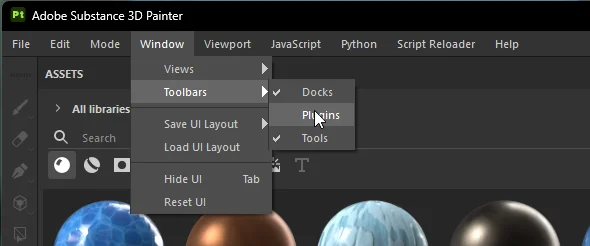
A menu appeared on the side in Substance Painter, how do I remove it?
Simple go to Window > Toolbars > Disable Plugins
Installing gives
[WinError 2] The system cannot find the file specified: ...\addons\gob_bl.py
This happens when 1.0.0 was removed or replaced while Blender was still open: Blender still has the old 1.0 add-on in memory. Close Blender completely, open it again, then go to Edit > Preferences > Add-ons and tick GoB (install gob_blender_1.1.0.zip again if it isn't listed). Nothing needs to be deleted by hand.
- Added: Skins - export
Skin: Namelayer folders as separate skins, switch between them in Blender with one click - Added: Bridge Manager - see and manage every linked project (Send, Import, Open, Rename, Relink, Forget)
- Added: 'Send to' menu - pick a new or existing Painter project, and see where it goes before you click
[Blender Addon] - Added: Projects remember their Blender objects and scene, so sends always go to the right project
- Added: Option for one Painter project per Blender scene
[Blender Addon] - Added: New projects auto-save next to your .blend and never overwrite an existing .spp
- Added: Auto triangulation on export (your Blender mesh stays untouched)
[Blender Addon] - Added: Height mode: Auto, Bump, Displacement or Ignore
[Blender Addon] - Added: Live send status and a prompt in Painter when a send arrives for another project
- Added: Blender 4.2 LTS support and Steam install detection
[Blender Addon] - Added: Multiple models in one .blend - each with its own material and UVs gets its own texture set, models without a material too
- Added: Setup sections fold open/closed, and GoB remembers your settings across updates and Blender versions
[Blender Addon] - Improved: Exporting skin folders also exports Default, and importing all skins keeps the skin you had
- Improved: Every export preset now imports correctly (all 59 tested), 16-bit maps stay 16-bit
- Improved: Height looks like it does in Painter, no more doubled or blocky details
- Improved: Auto-split pairs low, high and cage meshes, also on big multi-part models
[Blender Addon] - Improved: Re-importing updates the same object instead of adding .001 copies
[Blender Addon] - Improved: No more stutter every 5 seconds, faster Send/Import, no blocking popups
- Improved: Existing 1.0 projects keep working, and installing over 1.0 cleans up the old files
- Changed: The Painter plugin is now a
gob_spfolder (zip) instead of a single .py file[Substance Painter] - Changed: 'Open New Painter Instance' is replaced by the 'Send to' menu
[Blender Addon] - Fixed: Sending a second object made the first one's textures go missing
- Fixed: Sending sometimes did nothing, or imported old sends in a new Painter window
- Fixed: Sending turned excluded collections back on
[Blender Addon] - Fixed: Black base color with some export presets, and failed exports deleting your textures
[Substance Painter] - Fixed: Hundreds of empty folders piling up in the bridge folder
- Fixed: Painter toolbar buttons showing "…", and unticking For Roblox keeping the Roblox template
[Substance Painter] - Fixed: Duplicate meshes after importing, and smart materials making parts see-through in Blender
- Fixed: Clearing the cache deleted a .blend or .spp saved in a project's folder
[Blender Addon] - Fixed: Renaming a material in Blender made Painter delete its painted texture set
- Fixed: An unanswered "Blender sent…" prompt blocked all later sends
[Substance Painter] - Fixed: 210 bugs in total
Update both the Blender Addon and the Substance Painter plugin, 1.1.0 and 1.0.0 can't talk to each other.
Tested in: Substance Painter v12.1.5, some features may not work in older versions.
Tested in: Blender 4.2/Blender 4.5/Blender 5.0/Blender 5.2
Not tested on: macOS/Linux (support was improved, please report any bugs)
- Switched updaters from GitHub to here
- Added: cage exporting
[Blender Addon] - Added: Template support (Self-made ones included)
[Blender Addon] - Added: Support for Color Management (Legacy, OpenColorIO. For Substance Painter v12)
[Blender Addon] - Added: Normal Map Format Picker (OpenGL/DirectX)
[Blender Addon] - Added: Resolution Picker
[Blender Addon] - Added: UDIM Workflow Export Support
[Blender Addon] - Added: 'Unwrap UVs in Painter' (For both Default, Hard Surface)
[Blender Addon] - Added: Button 'For Roblox (SurfaceAppearance)' + Support for Roblox Emissive Maps
[Substance Painter] - Improved: the UI in Blender
- Improved: Auto-split by a lot
- Improved: The 'Send to Substance Painter' Algorithm
- Improved: The 'Import From Substance Painter' Algorithm
- Fixed: over 65 bugs
Tested in: Substance Painter v12.1.0, some feature may not work in older versions.
Tested in: Blender 4.5/Blender 5.2
- Fixed Import/Export Bugs
- Fixed several other bugs
AVOID THESE IF POSSIBLE
- Fixed Multi-export from the Same scene Bug
AVOID THESE IF POSSIBLE
- Added hotkey to 'Send to Blender'
- Fixed bug
AVOID THESE IF POSSIBLE
- Added: Cache Auto Deleter- Set max GB; if the global cache goes over the entered amount, it'll auto clean all files (excluding the current open project)
- Added: Project Link- You can now reopen project files directly from Painter/Blender based on the file it's linked to
- Added: You can now export your High and Low polys based on Collections rather than names (You will get baking issues if not used correctly)
- Added: You can now drag select/deselect Texture Sets and Maps (SP)
- Added: 'Open new Painter Instance' use if you wanna open multiple Painter files with different meshes within the same Blend file
- Improved: how the Importer/Exporter works (SP/Bl)
- Improved: UI (SP/Bl)
- Other quality of life features
- Fixed: Many broken templates
- Fixed: Bugs
AVOID THESE IF POSSIBLE
- Fixed bugs
- Improved UI
- Improved Performance (SP)
- Improved Exports (SP)
- Improved Imports (Bl)
AVOID THESE IF POSSIBLE
- Fixed Texture Export Bugs / others
AVOID THESE IF POSSIBLE
- Fixed macOs and other Bugs
AVOID THESE IF POSSIBLE
- Fixed High Poly Import Bug
AVOID THESE IF POSSIBLE
- Added Experimental feature
- Fixed bugs
- Remove Auto Unwrap
AVOID THESE IF POSSIBLE